by Vahid
3. March 2009 03:54
Web user controls are easy to make, but they can be less convenient to use in advanced scenarios. You develop Web user controls almost exactly the same way that you develop Web Forms pages. Like Web Forms, user controls can be created in the visual designer, they can be written with code separated from the HTML, and they can handle execution events. However, because Web user controls are compiled dynamically at run time they cannot be added to the Toolbox, and they are represented by a simple placeholder glyph when added to a page. This makes Web user controls harder to use if you are accustomed to full Visual Studio .NET design-time support, including the Properties window and Design view previews. Also, the only way to share the user control between applications is to put a separate copy in each application, which takes more maintenance if you make changes to the control.
Web custom controls are compiled code, which makes them easier to use but more difficult to create; Web custom controls must be authored in code. Once you have created the control, however, you can add it to the Toolbox and display it in a visual designer with full Properties window support and all the other design-time features of ASP.NET server controls. In addition, you can install a single copy of the Web custom control in the global assembly cache and share it between applications, which makes maintenance easier.
considering the kind of flexibility we get from web custom controls, i believe most of the times it would be much better to use custom controls.
| Web user controls | Web custom controls |
| Easier to create |
Harder to create |
| Limited support for consumers who use a visual design tool |
Full visual design tool support for consumers |
| A separate copy of the control is required in each application |
Only a single copy of the control is required, in the global assembly cache |
| Cannot be added to the Toolbox in Visual Studio |
Can be added to the Toolbox in Visual Studio |
| Good for static layout |
Good for dynamic layout |
by Vahid
1. March 2009 16:24
Check out the following article about Integrating PayPal Payments into ASP.NET E-Commerce Applications. this a very descriptive, useful article.
http://www.west-wind.com/presentations/PayPalIntegration/PayPalIntegration.asp


The process of integrating a PayPal
payment involves several pages and HTTP POST backs.
by Vahid
17. February 2009 15:32
need to know about new cool features in visual studio 2010? check this link which describes new features for entity framwork in vs 2010
http://blogs.msdn.com/efdesign/archive/2009/01/22/customizing-entity-classes-with-t4.aspx
by Vahid
17. February 2009 15:17
browsing internet i found this document about ado.net entity framework which comes with microsoft .net framework 3.5 sp1.
check it out at:
(reference http://cid-245ed00edb4c374e.skydrive.live.com/self.aspx/Public/entity%20framework%20learning%20guide.pdf)
by Vahid
17. February 2009 13:30
What is the Azure Services Platform?
he Azure™ Services Platform (Azure) is an internet-scale cloud services
platform hosted in Microsoft data centers, which provides an operating
system and a set of developer services that can be used individually or
together. Azure’s flexible and interoperable platform can be used to
build new applications to run from the cloud or enhance existing
applications with cloud-based capabilities. Its open architecture gives
developers the choice to build web applications, applications running
on connected devices, PCs, servers, or hybrid solutions offering the
best of online and on-premises.
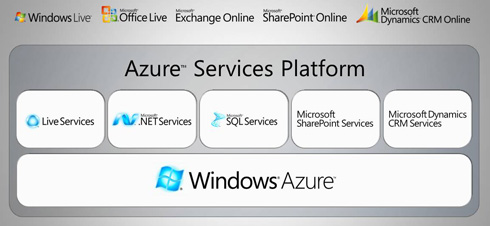
Windows Azure
Windows® Azure is a cloud
services operating system that serves as the development, service
hosting and service management environment for the Azure Services
Platform. Windows Azure provides developers with on-demand compute and
storage to host, scale, and manage internet or cloud applications.
Windows Azure supports a consistent development experience through its
integration with Visual Studio. In the early stages of CTP, .NET
managed applications built using Visual Studio will be supported.
Windows Azure is an open platform that will support both Microsoft and
non-Microsoft languages and environments. Windows Azure welcomes third
party tools and languages such as Eclipse, Ruby, PHP, and Python.
by Vahid
10. February 2009 13:46
Hi,
if you have been working with Windows communication foundation and you still don’t know how to organize your layers in a very good way, you have to check this out. in this video of DNRTV Miguel Castro shows us how to get the best out of Windows Communication Foundation. Miguel extholls the virtues of doing WCF projects from scratch, and not using the Visual Studio templates. you can get/watch the video from the following link
http://www.dnrtv.com/default.aspx?showNum=122
by Vahid
30. January 2009 14:36
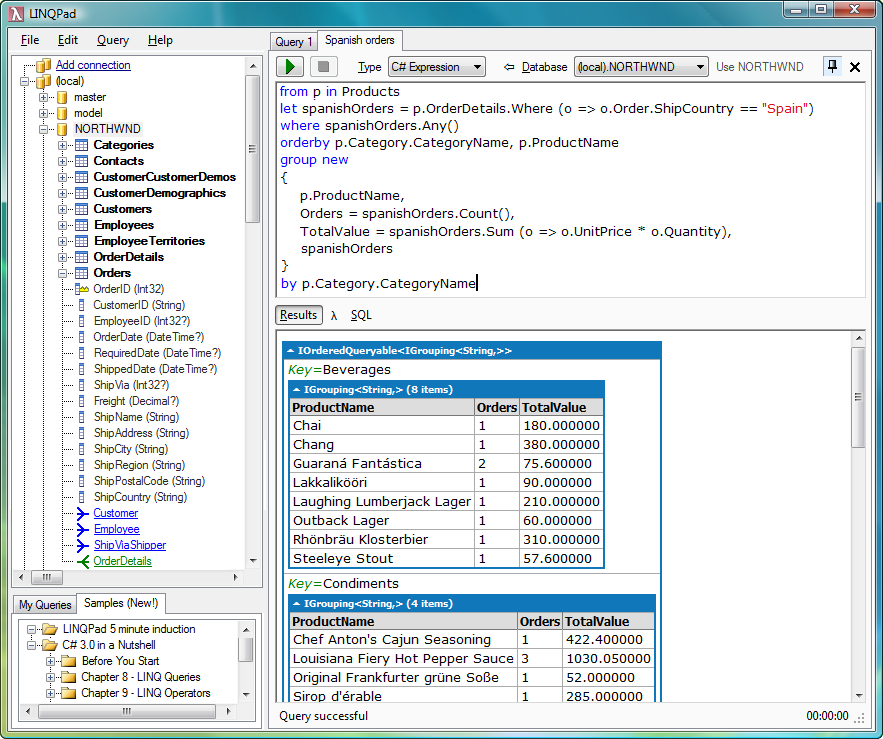
Want to learn LINQ? looking for a lightweigh and fast application to evaluate your linq expression? now check this out. i found a very good free application which lets you interactively query SQL databases
in a modern query language: LINQ. LINQPad is also a great way to learn LINQ: it comes preloaded with 200 examples
from the book, C# 3.0 in a Nutshell. And finally LINQPad is more than just a LINQ tool: it's a code snippet IDE
that instantly executes any C#/VB.net expression, statement block or
program. Put an end to those hundreds of Visual Studio Console projects
cluttering your source folder! you can get it from here.
by Vahid
30. January 2009 03:34
if you want to develop and ECommerce application in .net, you should definitely check the post regarding a real eCommerce article. For sure it will help a lot.

by Vahid
25. January 2009 15:30
here is a quick comparision between microsoft c# (.net) and java
| Concept |
C# |
Java |
Notes |
| Virtual machine |
CLR |
JVM |
CLR is not quite the same as JVM concept, but very similar. |
| Namespace |
namespace/
using |
package/
imports |
C# allows multiple namespaces in a file, Java does not. |
| Attributes |
[attribute] |
@annotation |
C# 1.0, Java 1.5 |
| Base class |
base |
super |
|
| abstract objects |
abstract class |
abstract class |
|
| abstract methods |
abstract |
abstract |
|
| sealed objects |
sealed |
final |
In both cases, sealing is discouraged. |
| sealed methods |
sealed |
final |
|
| replacement methods |
new keyword |
not supported |
Effectively ignores the base method. |
| constants |
const / readonly |
final static |
|
| Enum's |
enum keyword |
enum keyword |
C# 1.0, Java 1.5 |
| virtual functions |
explicit virtual |
always virtual |
This is one of the gotcha's when working between the two languages |
| override intention |
override |
@Override (though members override by default) |
Causes compiler error if method is not actually overriding a base method. |
| Class/Type representation of simple types |
Map 1:1 with the simple type keywords. |
Behave different to simple type keywords. |
C# seems more natural than Java in it's behavior |
| Getters/Setters |
get/set keywords, behave like properties |
Explicit get/set methods |
Again, C# seems more natural with this. |
| Events |
Typically via delegates |
Typically via interfaces |
|
| Reference equivalence |
Object.
ReferenceEquals()
|
== |
Another C# vs Java gotcha. |
| Value equivalence |
== or
Object.Equals()
|
object.equals(),
== for value types
|
Java's choice of using == for reference equals adds to the need to distinguish between objects and value types. |
| Object introspection |
Object.GetType() |
object.class |
Very similar |
| Exceptions thrown by method |
implicit |
throws keyword |
Actually liking Java's philosophy here, albeit taking some getting used to. |
| Stack scoping |
using keyword, or try/finally keywords |
try/finally keywords |
'using' keyword is syntax sugar that calls IDisposable.Dispose() method at end of block. |
| Simple synchronization |
lock keyword |
synchronized keyword |
'synchronized' can also be used on a method. |
| Generics |
class<type> |
class<type> |
C# 2.0. Java 1.5. C# has a cleaner implementation and discovery of generics in reflection. In Java, class and class<type> cannot co-exist. class becomes synonymous to class<object>. |
| Output parameters |
out, ref |
Not allowed |
Not a huge loss in Java, there are simple workarounds. |
| Switch fall-through |
Not allowed |
Allowed |
|
| iteration |
foreach(type x in y) |
for (type x : y) |
C# 1.0. Java 1.5. |
| Lambda/Closures |
=> |
(future) |
C# 3.0. Java 1.7 (maybe) |
by Vahid
20. January 2009 05:42
in the last sub system which we were working on, there was requirement to export the result of a query which is from oracle database and is displayed in an asp.net data grid into excel file. but the component we are using for export to excel functionality gets the collection as input parameter and export the data to excel file and write the excel file into response object of the asp.net. this means once the functionality is invoked, a dialog box will be displayed asking Open the file, save the file of cancel the operation. no issue with save and cancel. but when they clicked on the open it opens the excel file in the same browser window where they were viewing the page and they close the window once they were through with viewing the excel file. this means they close the application.
now they needed the excel file be opened in a new window so that they will not loos their application states. what we did to do so is a little bit tricky. in the query page when user clicks on export to excel button we save the data to be exported in an asp.net session state and open a new browser on the user's machine using following code :
BaseList<QueryInvoiceResult> result = GetInvoices(p);
Session["exceldata"] = result;
Response.Write("<Script>window.open('ExcelExport.aspx')</Script>");
and we also moved the export to excel logic to the ExcelExport.aspx page
try
{
if (Session["exceldata"] != null)
{
BaseList<QueryInvoiceResult> result = (BaseList<QueryInvoiceResult>)Session["exceldata"];if (result.Count > 0)
{
ExportToExcel(ExportToExcelContent(result));
}
}
}
catch (Exception)
{
throw;
}
finally
{
Session["exceldata"] = null;
}
 Subscribe