by Vahid
14. January 2009 07:29
I have been waiting for this for long time. the first version has been really usefull for me.
this is an official guied for application architecture provided by patterns and practicess team at microsoft. i hope this will be usefull for you also and let's thank the team for the greate job.
Get it here

by Vahid
13. January 2009 16:37
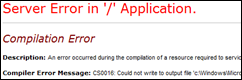
if you are also new to IIS7 like me and have tried to deploy an ASP.net web site to IIS7, you must have faced the same problem i was facing which was so annoying. i was trying to deploy a web application to IIS7 running on vista home premium. deployment was ok, but when i was trying to access the site i was receiving the following error
BuzzNet Tags:
.net,
asp.net,
iis7CS0016: Could not write to output file 'c:\Windows\Microsoft.NET\Framework\v2.0.50727\Temporary ASP.NET Files\… ‘Access is denied.’
i had no clue why this was happening as everything seemed to be ok for me.
So, I figured, “OK this is probably a permissions issue” as I have encountered similar before in XP, where the ASPNET user account needed to be added. I also know that in Vista this account is called “NETWORK SERVICE”. I then update the permissions for the “Temporary ASP.NET Files” folder in the .NET Framework folder, eagerly get back to my browser, hit F5.. Boom. No dice, same error message.
After doing some digging on the Internet I found out that
I also need to set the permissions for the C:\Windows\Temp folder!
To resolve, ensure your permissions are correct for both temp directories:
- Browse to “C:\Windows\Microsoft.NET\Framework\{Vers.}\”.
- Right click the “Temporary ASP.NET Files” folder.
- Click “Properties”.
- Click the “Security” tab.
- Click “Edit” and confirm the UAC prompt.
- Click the “Add” button.
- In the “Enter Object Name” field, enter “NETWORK SERVICE”.
- Click “Check Names”, it should become underlined to confirm it is OK.
- Click OK.
- With the “NETWORK SERVICE” user selected, in the "Permissions for..” list, check the “Full Control – Allow” check box.
- Click “Apply” and “Yes” to the security prompt.
- Finally click “OK” to close the properties dialog.
- Repeat the above steps on the “C:\Windows\Temp” folder as well! (i.e. browse to “C:\Windows”, right click “Temp”, click “Properties” etc. etc.).

To be honest, I wasn’t sure I believed it at first. But I deleted all temp files from both folders and reset/removed the permissions, and the error reared its ugly head again.
I hope this helps any others with the same problem save time!
by Vahid
13. January 2009 13:30
i found a set of usefull samples for .net BCL (base class library). you can take them at the following link:
http://msdn.microsoft.com/en-us/netframework/aa569267.aspx
by Vahid
3. January 2009 05:36
hi,
as you may know c# is missing the nice and usfull IsNumeric function which is available in VB.net. but it is a trivial task to implement a generic equvelant function for it. look at the following code. it will return true if the value is numeric and false if the value is false.
static bool IsNumeric(object value)
{
double retNum;return Double.TryParse(Convert.ToString(value), System.Globalization.NumberStyles.Any, System.Globalization.NumberFormatInfo.InvariantInfo, out retNum);
}
 Subscribe